Archiv für die Kategorie ‘fedora’

Fortschritt, der sich selber überholt

Dienstag, 13. April 2010

Ich mag mein Fedora-System. Linux im Allgemeinen sowieso. Aber beim Lesen dieses Blogeintrags, auf den ich über Planet Fedora gestoßen bin, ist mir eines mal wieder bewusst geworden und unangenehm aufgefallen:

So sehr ich dafür bin, dass ständig neue Programme entwickelt werden, so unpraktisch ist es, dass es ständig neue Programme gibt. In obigem Blogeintrag werden die Programme Shotwell und Gnote erwähnt. Shotwell ist ein Foto-Managementprogramm und tritt die “Nachfolge” von F-Spot an, da es das standardmäßig installierte Programm zur Fotoverwaltung in Fedora 13 sein wird. Gleiches gilt für Gnote, das Tomboy als Programm für Notizen ersetzt.

Auch wenn ich den Vorteil der neuen Programme sehe, so ist der Aufwand, der durch die ständige Neuorganisation aufgrund der neuen Programme entsteht doch erheblich. Ich beneide ein wenig die Leute, die seit Jahren Programme wie iTunes für ihre Musik einsetzen oder Picasa für ihre Fotos. Sie haben wenigstens nicht das Problem, dass aufwändig und in stundenlanger Kleinarbeit erstellte Bibliotheken mit dem nächsten Release neu erstellt werden müssen. Gerade bei den Sachen, die sich über einen langen Zeitraum ansammeln, also hauptsächlich Fotos und Musik ist dieser ständige Wechsel einfach nervig!

Daher, liebe Softwareentwickler: Bitte stellt sicher, dass wenn schon ein Wechsel der Programme forciert wird, wenigstens alle Daten sauber übernommen werden können!

Fedora 11 ist da!

Dienstag, 09. Juni 2009

Endlich, nach nur einigen kleinen Verzögerungen, ist es endlich erschienen: Fedora 11, genannt “Leonidas”!

Was alles neu ist, das lässt sich den Release Notes entnehmen. Technischere Details zu einigen der Neuigkeiten kann man auch auf der “Feature List”-Seite im Wiki nachlesen.

Wem jetzt schon das Wasser im Munde zusammenläuft, oder wer Fedora oder Linux allgemein einfach mal ausprobieren möchte, der sollte nicht zögern, sich dieses Meisterstück herunterzuladen, am Besten per BitTorrent (ja, das ist auch in Deutschland legal …): http://torrent.fedoraproject.org/

Damit tut ihr gleichzeitig auch was gutes und helft, Fedora zu verteilen, ohne dass die Download-Server überlastet werden.

Viel Spaß!

Und ich kümmer mich mal weiter um meine Diplomarbeit …

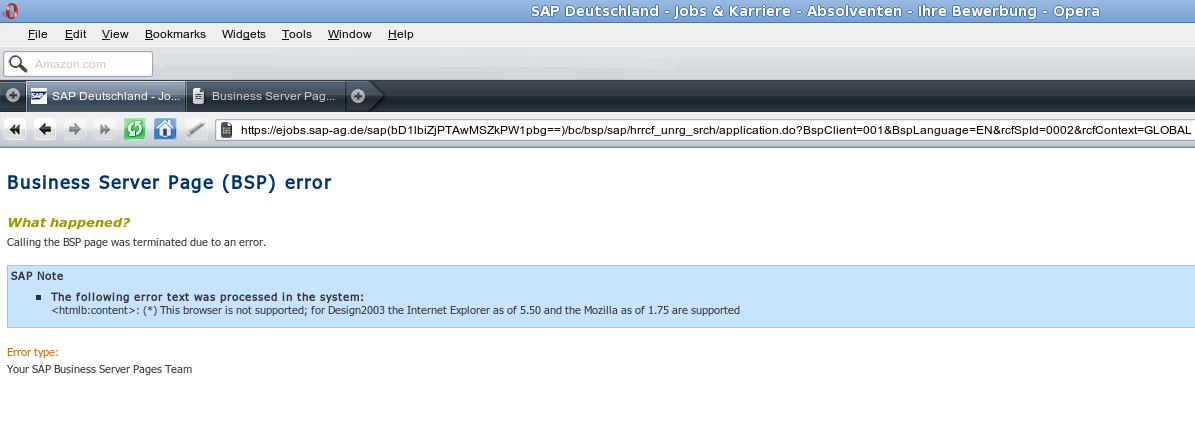
Global Solutions!?

Montag, 29. September 2008

Acting Globally – that usually means, that a company acts everywhere, right? Well, what about they act for everybody? Shouldn’t that be a part of calling oneself “global”? If so, at least one big, German company doesn’t get it:

PS: The site does not really work with Firefox, either. That’s why I tried Opera in the first place.

Good news in linux-land

Samstag, 07. Juni 2008

I have already mentioned earlier, that my new laptop and Fedora (back then in version 8) work quite flawlessly together. Things are always on a move, and since that other post, Fedora has been moving forward and it was released in version 9, codename Sulphur.

The change delivered several improvements. For me particularily useful are the new error-message-system of evolution (no annoying pop-ups anymore), Firefox 3 (still in beta/rc, though) and the better suspend/resume stuff. There is no more need for any quirks and the overall suspend/hibernate/resume-feeling is way better than it was ever before. In addition with another new Sulphur-feature, namely packageKit, it gave me an absolute astonishing, albeit small experience:

I usually only use the hibernate or suspend functionality and do not shut down the computer. This works without any problems – except when you install a new kernel and put the laptop to sleep afterwards. While rebooting, the latest kernel is chosen. The laptop tries to boot and sees, that there is a suspend-image which it tries to load. As the suspend image was created by the old kernel, the boot process might (and for me it did) fail. This messup may result in an undefined state and destroy data (well, again, that is what happened to me).

Say hello to PackageKit. After installing a new kernel, the suspend will fail. Although there is no notice of why it fails, it must be due to the new kernel. Small detail, but this little feature protects the user and its data because the inconsistency I described above can not happen (so easily)!

Linux on the desktop, way to go!

April, 1st

Dienstag, 01. April 2008

It’s joke time.

This came on the fedora-devel list this morning:

Subject: rawhide special report: 20080401 changes

Date: Tue, 1 Apr 2008 12:08:17 +0000 (UTC) (14:08 CEST)

New package apt
Advanced front-end for dpkg

New package dpkg
Package maintenance system for Debian

Removed package rpm

Removed package yum

Updated Packages:

[...]

Funny :-)

I wish I had internet

Mittwoch, 06. Februar 2008

This:

--- google.com ping statistics ---
49 packets transmitted, 30 received, 38% packet loss, time 54259ms
rtt min/avg/max/mdev = 1288.705/2175.903/3347.027/364.736 ms, pipe 4

really makes me want back my internet at home.

But a good reason to finally install and configure presto. For the sake of all the poor Linux users, who do not have a fast internet connection I really hope, that it will make it into Fedora 9.

Ich bin ein Babbelfisch!

Montag, 04. Februar 2008

Ich bin jetzt hochoffiziell Übersetzer in Fedoras German Translation Team. Was mache ich da? Übersetzen natürlich. Damit wird versucht, Linux, hier Fedora im Speziellen, für möglichst viele Sprecher nicht-Englischer Sprachen zugänglich zu machen. Weil Deutsch mit über 100 Millionen Sprechern eine große Zielgruppe ist, sind hier Helfer immer gerne gesehen.

Aber natürlich gibt es auch andere Möglichkeiten, bei Fedora mitzuhelfen. Diese Seite zeigt diese Möglichkeiten auf.

Schaut euch also meine Seite über mich an und meldet Fehler oder schlechte Übersetzungen! Dann können wir die verbessern!

Acer 8204 and Fedora

Montag, 04. Februar 2008

As some of you may have read or somehow learnt, I do own a new laptop now. Well, actually it’s only used-new, but as good as new and still with warranty. Anyway, first thing I did: Put in the Fedora 8 Live-CD, booted, enjoyed. Almost everything worked out of the box. Exceptions were the graphics (ATI Mobility Radeon x1300) and the webcam, at least everything else I checked worked, including wireless (most important!) and the CPU-throttling, which cools the laptop quite down a lot. So, next logical step: Install Fedora. After doing so, I activated the additional repositories, livna, freshrpms and atrpms. Following the guidelines from this tutorial, I got almost my previous installation. Only one really bothering thing was still there: Graphics not working!

The laptop does have the already mentioned ATI Mobility x1300 graphics chipset and there is the proprietary fglrx driver for it.  BUT: the version available until some time ago (7.12) did not support the native resolution of the screen, which is 1680×1050. I want that resolution, badly, that’s what I spent the money for! So, what are the alternatives? I don’t use the 3D-effects of the desktop, so any driver would be fine. That’s how I found out about the radeonhd driver. It’s a free, though yet incomplete driver for ATI graphic cards. At least, with it I got my 1680×1050 resolution. Too bad though, that it doesn’t allow me to use my webcam, at least it’s not working within skype and cheese but it worked when I used the fglrx driver for testing. Lately, a new version of that driver was released and it promises to fix my resolution problem. I will give it a try, as soon as it is in the livna-repo. And yes, I am too lazy to circumvent my package manager!

What would be the overall conclusion, regarding the Acer Travelmate 8204 and Fedora? Well, it is a pleasure. I barely, if ever reboot, as Suspend and Hibernate are working as well and I can say for sure, that this is the most productive and fastest laptop I’ve ever worked with. Well done, Acer! Not so well done, ATI!

Scr3wed

Montag, 17. Dezember 2007

Yesterday I somehow managed to screw up my home partition. It was a cryptsetup-luks encrypted partition and it seems like I wrote over the beginning of the partition when updating grub, which I had to do due to some re-partitioning… Today was consequently mostly spent on fixing that mess. At home I usually keep a copy of the most current Fedora Rescue CD. Or several copies. Well – I am not at home. And the Ubuntu 7.10 Live CD does not support LVM… Quite a hazzle with a not-so-happy ending.

Anyway, my “new” /home is now bigger (who would not like that) and my last backup is luckily less than two weeks old. Rdiff-backup is doing its thing and restoring (almost) all data.

Lessons learned:

  • backup, backup, backup
  • never screw with a system if you don’t have a rescue cd at hands
  • backup, backup, backup
  • rdiff-backup works really well *

Next time, I just won’t resize but delete stuff instead…

* somehow one directory within my ~/.evolution can not be restored. rdiff-backup hangs at 100% cpu and seems to do nothing on that 4 MB directory with ~20 files in it. I didn’t find anything on that, but if anyone knows something…

Mood-GNOME

Dienstag, 20. November 2007

Yesterday Evening I had an idea.

Inspired by the changing background in Fedora 8 (which rocks, by the way!!!), I had the idea about some “mood-applet” for GNOME (or any desktop, for that matter). What’s the idea?

Well, think of it as a global setting applet, where you can somehow “change” your mood, kind of like you do with the volume of your speakers. Depending on the mood, the desktop could change its appearance, the music selection could be influenced, your instant messenger will change your status, maybe something else?

It’s just an idea and I am not a programmer, who could implement it, but if there are some, feel free :-)